
Custom BIC Lighters with Pictures: Preparing Artwork That Prints Clearly
Custom BIC lighters with pictures need artwork that remains recognizable on a small, curved product. The first question is what kind of picture you want to use: a simple illustration, a detailed graphic or a photograph. That decision helps determine the print format and how much preparation the file needs.
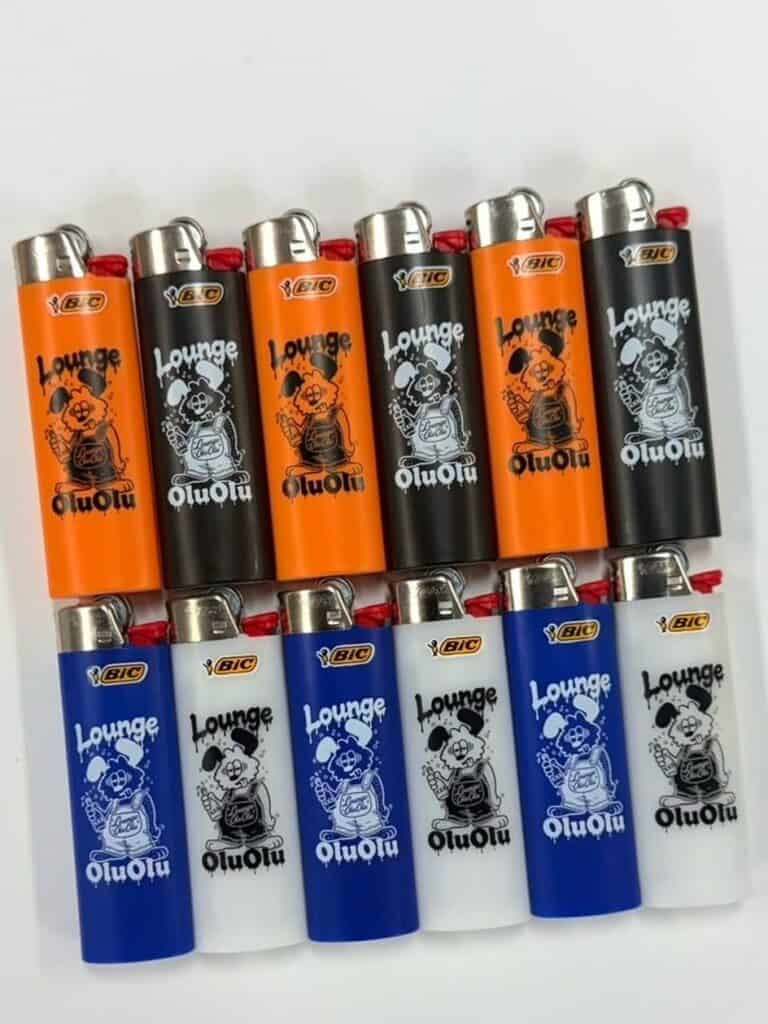
The illustrated lighter set shown here offers a useful starting point. The same graphic appears on several body colors, with light or dark artwork chosen to create contrast. It shows how one clear image can carry a collection without filling the design with extra text.
Choose a print format before preparing the image
A drawing made from clean lines and solid colors may work well as a direct imprint. A photograph or an image with gradients needs a different conversation because it contains many tones rather than a few separate ink colors.
Start by comparing direct-printed BIC lighters with full-color wrapped BIC lighters. The wrapped option provides a full-color canvas around the body and is worth discussing for picture-based artwork. Have the team confirm that your specific image is suitable before building an order around it.
Do not assume that choosing four solid imprint colors is the same as choosing photographic full-color reproduction. Match the decoration method to the artwork, rather than relying on the word “color” alone.
Give the picture one clear focal point
Choose the part of the image that needs to be recognizable first. That might be a face, a character, an album graphic or a product illustration. Crop away background details that do not help someone understand the design.
A busy photograph can look appealing on a monitor and become difficult to read when reduced. Try viewing the layout at the size shown on the product template. If the subject disappears, use a closer crop or select a simpler image.
Keep any supporting words short. A brand name and a brief phrase usually leave more room for the picture than a full address, several social handles and a long slogan.
Start with the original artwork file
Use the original high-quality image or design file whenever possible. A screenshot from a social post may already have been compressed or resized. Enlarging that screenshot does not restore missing detail.
For solid-color illustrations and logos, prepare vector artwork according to the artwork requirements. For photographic artwork, ask for the image-resolution and file requirements for the selected wrap. Merely saving a photograph as a PDF does not convert it into vector art.
Use artwork you own or have permission to reproduce. If a designer prepared the image, ask for the production file along with the version used for web previews.
Use the template for the exact lighter
The lighter’s physical dimensions are not the same as its printable area. Download the template from the product you intend to order. A direct-imprint template and a full-wrap template should not be used interchangeably.
- Keep faces, logos and essential text inside the safe area.
- Extend backgrounds into bleed areas only as the template directs.
- Check how the design meets at a wrap seam.
- Review the orientation of the image while the lighter is upright.
- Confirm the appearance of every body-color and ink-color combination.
For two-sided direct printing, remember that the standard BIC compliance sticker is shipped over the back-side print. Plan the primary image so the first impression does not depend on that area.
Review the proof as a finished product
Check more than spelling. Look at the crop, the image scale, the contrast and the relationship between the picture and any lettering. Review each side separately, then imagine how the lighter will look when someone turns it in their hand.
A digital proof helps confirm the layout, but screen colors are not a guarantee of an exact physical color match. Raise any critical color or fine-detail questions before approving production.
Can I order a small set with different pictures?
Custom printing minimums depend on the product and artwork setup. Do not assume that a photo of several finished lighters represents an available six-pack or a different picture on every unit. Confirm quantities and design variations on the current product listing or with the team.
Ready to turn your artwork into merchandise? Compare the custom BIC lighter range and choose the format that suits your picture before finalizing the file.
